

2022 Job Order Contract Best Management Practices Research and independent third party audits have found the following to be characteristic of JOC Program implementations: o JOC contracts using a 3rd party intermediary (consultants) result in… More
Implementing LEAN Construction Delivery
Implementing LEAN construction delivery involves an integration of Strategy, People, and Process appropriate to the specific organization.
Today, all the tools and services are readily available to any real property owner that wants to consistently procure and execute quality repair, renovation, or new construction projects on-time and on-budget.
For example, the OpenJOC(TM) Job Order Contracting Solution is a powerful LEAN construction services procurement and project delivery method for best value construction services production planning and life-cycle management…from concept through warranty and beyond.
Using the OpenJOC(TM) Job Order Contracting Solution enables real property owners and facilities managers to more efficiently plan their work and execute by collaboratively teaming with their awarded builders. Owner/builder teams that apply the OpenJOC(TM) Job Order Contracting Solution have been able to significantly reduce the project delivery times, while increasing the quality of the finished work and reducing overall cost. Furthermore, they were able to more accurately and transparently forecast cost, schedule, and labor demands leading to more efficient use of limited resources.

Procure & deliver Best Value, financially transparent, and compliant facilities repair, renovation, and construction services.
Help guide your organization to achieve measurable productivity gains with respect to facilities repair, renovation, and construction.

When Job Order Contracting Goes Wrong
Construction Cost Estimating
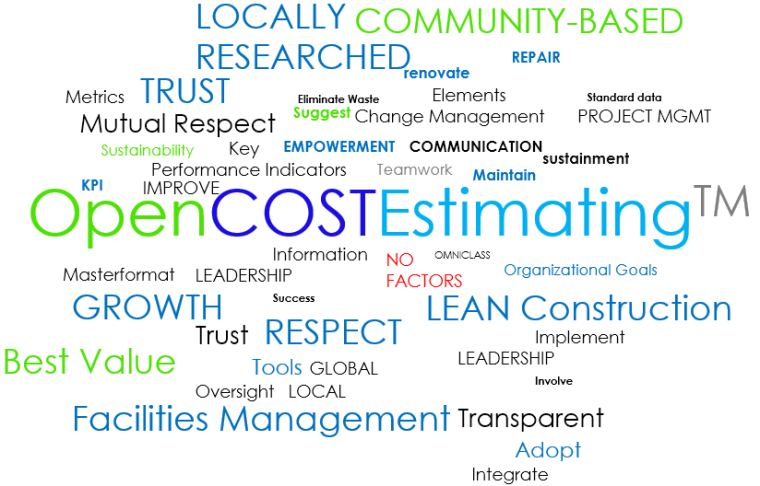
Best practice, consistent, and efficient construction cost estimating should consider Owner, Builder, and AE requirements. Here’s a shortlist for your consideration and comment.
1. EXPERIENCE, EXPERIENCE, EXPERIENCE. Nothing is more important than decades of actual experience in the field as well as detailed line item experience.
2. COMMUNICATION – Use industry standard terms in plain English for each construction task. Minimize the use of acronyms and/or abbreviations. In fact only use abbreviations for units of measure.
3. Common data format (CDE) – Use CSI MasterFormt (50 division) to organize data.
4. Detail – Assure labor, material, and equipment breakdowns are available for EACH task as appropriate.
5. Integrate your work with a LOCALLY RESEARCHED unit price commercial construction cost data base. You can’t know or keep up to date on everything, and even if you did/could, this is a great way to supplement your data. DO NOT USE a national unit cost book and/or location factors/indexes. The latter will introduce significant error.
Job Order Contracting Solutions

OpenJOCTM LEAN JOB ORDER CONTRACTING SOLUTIONS
The OpenJOC approach drives maximum productivity by leveraging proven LEAN construction delivery processes.
1. Process – A written Job Order Contract Operations Manual / JOC Execution Guide plays a central role by fully documenting roles, responsibilities, business practices, means, methods, and outcomes.
2. Information – A shared common data environment, CDE, assures a mutual understanding of all project requirements. Industry standards terms and definitions, in plain English, and a standardized, detailed listing of locally researched construction tasks inclusive of labor, material, and equipment costs (organized using CSI MasterFormat).
3. Uses – On-demand renovation, repair, maintenance, sustainability projects and minor new construction are supported within the OpenJOC environment.
4. People – Real property owners and/or facilities management provide leadership, without excessive management and control. All participants contribute to project success within and atmosphere of collaboration, mutual respect, and shared risk/reward.
5. Technology – The role of technology is one of enablement. Cloud technology provides a secure method for all participants to create, view, and share current actionable information. Communications, tasks, and documents are all maintained in a common digital environment.
6. Assessment & Training – Key performance indicators, KPIs, and regular audits, as well as required ongoing training, assure proper JOC Program implementation, management, and continuous improvement.
Owners Inefficiently Using Job Order Contracting
Some real property owners don’t take advantage of the major benefits of job order contracting. For example, some pay a JOC “program management fee” or similar fee to a JOC consultant to create and/or review JOC task order estimates. The fee may or many not include software and cost data. The fee can average as much as 8% of total construction dollars spent.
This practice can create several issues. First, this fee based approach can easily result in millions of dollars spent annually. Funds that could have been spent on actual construction costs. Second, adding a JOC consultant to the mix can create an “arms length” relationship between the JOC contractor and the Owner. A fundamental element and benefit of JOC is the early and ongoing collaboration and information sharing directly between the JOC Contractor and the JOC Owner.
The most cost effective deployment of JOC simply requires an Owner to engage in ongoing training and to procure appropriate JOC software and an associated locally research unit price book.
Learn more at http://www.4BT.US
info@4BT.US


What You Need to KNOW about Job Order Contracting
Not all Job Order Contracts (JOC) are not the same.
Carefully review all of the Job Order Contract and all associated documents. Make certain that the roles, responsibilities, tools, requirements and liabilities associated with the JOC are specified.
The following is a listing of Job Order Contract Do’s and Don’ts. This format is used to review the primary elements of a Job Order Contract from a “best practice” perspective with a focus upon the construction contractor. It is important to review all Job Order Contract provisions to assure avoidance of any unnecessary financial risk or potential legal issues.
Job Order Contracting (JOC) is a competitively bid, firm-fixed price, Indefinite Delivery Indefinite Quantity (IDIQ) LEAN construction delivery method. It is also implemented by the United States Air Force under the term SABER. Although some basic attributes of a JOC were originally developed in the early 1980’s in Europe, JOC was greatly refined in the United States by the U.S. Army and U.S. Air Force in the late 1980’s and continues to be improved and expanded.
JOC FUNDAMENTALS – Job order contracting, like any LEAN best management process, has basic requirements that focus upon collaboration, transparency, quality, and continuous improvement:
- Early and ongoing involvement of ALL participants.
- Value and qualification based selection and procurement.
- Cost and accounting transparency via standardized cost data architectures, terms, and definitions.
- Shared risk/reward.
- Appropriate use of supporting technology.
- Centralized reporting and oversight with local empowerment, application, management – monitoring, metrics, and continuous improvement.
- Mutual respect.
IMPORTANT: If the Job Order Contract is not in alignment with these core best practices, it is recommended that you discuss the document in more detail with appropriate parties.
Unit Price Book: Do’s
The JOC Unit Price Book (UPB) should provide a sufficient number of unit price line items to assure the ability to create detailed construction costs estimates for each task of which the value derived from the UPB is at least ninety (90%) of the total construction value of the project.
Each line item should include a description using common terms, written in plain English, and without abbreviations. Material, equipment and labor costs for appropriate renovation, repair, and minor new construction tasks should also be incorporated.
The JOC UPB should be locally researched specifically for the area(s) of coverage designated by the Contract (not use or be dependent upon localization factors or indices).
The JOC UPB should be developed and maintained by an independent and objective resource.
Separate demolition line items should be included.
Line items modifiers (items that add to, or deduct from, the parent line item cost) should be included as appropriate to account for quantity, site/location factors, material qualities, etc.
Labor rates should reflect the local prevailing and other wage requirements of applicable local laws (Davis-Bacon Wage Rates).
Unit Price Books should be updated annually.
Premiums for restricted area (e.g. prison, airport, court house) work and after-hours work will need to be included in the books, or otherwise provided for.
Review the methodology used to create the Unit Price Book being used for the Job Order Contract.
What is the background of the individuals that created the UPB?
What is the total number of material, labor, equipment, modifier, and demolition line items?
Are new items added to the UPB throughout the period of the JOC? Frequency?
Unit Price Book: Don’ts
The UPB should not have an excessive number of line items. Hundreds of thousands of line items are not required for the majority of multi-trade JOCs. In fact fewer than 40,000 line items should be adequate.
While unit price books may contain several hundred thousand line items, approximately 10,000 line items are typically used on a regular basis for estimating most of the common facility related renovations and repair tasks encountered.
Single trade JOCs require even fewer line items. An excessive number of line items actually can be a major contributing factor to higher costs. Researching, maintaining, locating, and reviewing data can all be excessively cumbersome, time consuming, and costly if the UPB is unnecessarily large.
The JOC UPB should NOT be associated with any consultant for resource that will benefit directly from construction dollars spent on projects, especially if that resource also has a decision-making role with respect to JOC task order/construction project awards. Example: receiving payment for services based on a percentage of total JOC construction volume.
The UPB should not use or be dependent upon localization factors or indices.
Non-prepriced work, tasks that are not within the unit price book, should not exceed 10% of the total value of the job order. The cost of non-prepriced work should be based upon the best value alternative derived from three (3) written quotes, copies of which should be reviewed by the owner technical team and procurement authority.
Note: Most JOC Consultants and JOC Unit Price Book providers place the responsibility upon JOC Contractors to verify the unit prices and to modify their coefficient(s)/adjustment factors accordingly.
JOC Coefficient: Do’s
In general, JOC coefficients should range between 0.80 and 1.20. The use of a standard hour, non-standard hour, and non-prepriced coefficient are also a common practice. There may also be coefficients applicable to specific locations or regions.
JOC Coefficient: Don’ts
Don’t bid or consider working on JOC with coefficients of less than 0.80 unless you have thoroughly reviewed all factors involved and have determined that there are extenuating circumstances and that a reasonable profit is likely attainable.
JOC Consultant: Do’s
An Owner-managed JOC is the most efficient, beneficial, and least costly mode of JOC Program implementation for Owners with numerous and ongoing renovation and repair needs exceeding approximately $2,000,000 per year.
In some cases, however, a JOC Consultant is hired to assist in core Job Order Contracting processes. If a JOC consultant is involved, it is generally because the real property owner does not have the competence, capability, and/or resources to deploy a fully independent owner-managed Job Order Contracting Program.
Cooperative (COOP) JOCs: Do’s
An Owner-managed Job Order Contract is the most efficient, beneficial, and least costly mode of JOC Program implementation for Cooperatives with numerous regional, state-wide, and/or national members (various educational and/or non-federal government agencies) with ongoing facilities renovation and repair needs exceeding approximately $2,000,000 per year.
In some cases, however, a member may use a Cooperative’s JOC Managed Service[4] , due to a volume of JOC work lower than a cost effective threshold, or to learn more about the JOC process. Participants should carefully review the COOP program to assure there is proper support, that JOC best practices are followed, and that any associated fees are not excessive.
Cooperative (COOP) JOCs: Don’ts
If a JOC Cooperative is involved, it is generally because the real property owner does not have the competence, capability, and/or resources to deploy a fully independent managed Job Order Contracting Program. Do not get involved in a JOC Cooperative that charges excessive fees based upon total construction dollars. Fees are generally considered excessive at the four percent (4%) or greater level, however, any JOC fee greater than two (2%) is deserving of additional scrutiny. Make certain that your company can both perform adequately AND make a reasonable profit.
JOC Programs Involving JOC Consultants: Do’s
If a JOC Consultant is involved in supporting the real property owner, or managing aspects of a JOC Program, clarify the role of the consultant:
- Assure the JOC consultant is an independent, objective, and a fully transparent resource.
- Clarify the primary roles and objectives of the JOC consultant.
- Determine if the JOC consultant is working to support all JOC participants or acting strictly to the Owner’s benefit as owner’s representative.
- Establish the details of how the JOC consultant is being compensated.
The primary role of a Job Order Contracting Consultant may include the design, implementation and management, including Who, What, How, Why, and Timing, in specific areas such as…
- Job Order Contract strategic planning and development
- Local Unit Price Book development
- Job Order Contracting Software
- JOC Education, Training, and Certification
- Ongoing Support
- Creation of a JOC Operations Manual, Policies and Procedures
- Monitoring Objectives and Goals, Key Performance Indicators (KPIs)
- JOC Program Marketing
- Information Handover
- JOC Program Performance Audits
The overall goal of any best practice Job Order Contract is provide significant measurable long term benefits for ALL JOC Program participants… Owners, Cooperatives, Contractors, Subcontractors, Building Users, and Oversight Groups.
JOC Programs Involving JOC Consultants: Don’ts
If a JOC consultant is managing the JOC Program and has a decision-making role in approving JOC task orders or projects, the situation requires significant additional scrutiny. There may be instances where it is best for a JOC construction contractor to not get involved. Improper design and/or management of a Job Order Contract may result in significant conflict of interest and carries a higher risk of fraud and/or misuse.
Language in a Job Order Contracting RFP should be carefully reviewed as it may create a situation that fails to consider the best interests of all JOC participants. The following are examples of situations that may require additional investigation.
“The JOC Contract Implementation Services agreement will be a performance-based contract with no fees paid up-front to the JOC consultant, but a percentage fee is paid for successful issuance of construction task orders resulting from the consultant’s preparation of unit price books and contract bid documents.”
“Consultant’s Annual Fee: For the satisfactory performance of all required services hereunder, the Consultant shall be paid an Annual Fee, the amount of which shall be calculated as a percentage of the dollar amount of task orders which are (a) issued to construction contractors utilizing the JOC System, and (b) registered by the Comptroller during the specified year.”
Remember that if a JOC Consultant is managing the JOC Program, or supporting the JOC in areas beyond training, tools, or auditing, it can be due to the associated lack of JOC knowledge and/or resources on the part of the real property owner. This factor, when combined with the introduction of a third party (the JOC consultant) into the JOC work processes, can create confusion, delays, and other issues than can negatively impact the JOC program and the awarded JOC construction contractors.
JOC Software Technology: Do’s
Job order contracting software should primarily focus upon enabling contractors and owners to create detailed line item construction cost estimates, using the appropriate JOC unit price books that adequately reflect the scope of work required by the owner.
The software should be easy to installed and use. It should lock the JOC unit price book as well as clearly differentiate between priced (unit prices from the current JOC unit price book) and non-prepriced line items (NPP).
Cloud-based software provides the above as well as enables higher levels of collaboration.
The system should support the JOC process.
JOC software should also be reasonably priced and available on a price per concurrent user.
JOC Software Technology: Don’ts
Do not rely upon spreadsheets or “cost calculators”, or online generic cost estimating systems for a JOC. These approaches are cumbersome and prone to error. In addition, not using JOC-specific software may create serious issues regarding contract compliance and lead to economic loss and/or legal issues.
JOC software should not hinder the JOC process or negatively impact productivity.
JOC software fees should not be paid as a percentage of the overall construction volume, as this can easily result in excessive costs.
Subcontracting: Do’s
Follow all requirements noted in the JOC solicitation such as… “The Proposer shall clearly indicate what portions of the scope of work will be subcontracted. Provide an organizational chart of prime and subcontractors to illustrate contractual relationships, and clearly indicate in the proposal response which entity is responsible for which portions of work.” Monitor the quality and amount of work performed by subcontractors to assure compliance with contract requirements.
Subcontracting: Don’ts
Do not engage a subcontractor that is not familiar with and/or willing to use a JOC Unit Price Book and detailed line item cost estimating; Or if there are restrictions relative to use of subcontractor similar to the following example: “The Consultant is not permitted to enter into any subcontract(s) for construction services for the JOC Program.”
Technical Specifications: Do’s
Technical Specifications are generally referenced in the Job Order Contract. In most cases the technical specifications have already been developed by the owner/facility manager and reflect current commercial construction standards. In most cases the technical specifications are developed and maintained using either Masterspec, BSD SpecLink, or Unified Facilities Guide Specifications (UFGS). There may be some modifications to these “standard” specifications and/or a limited number (generally less than two hundred – 200) of customer specification required do to specialized infrastructure requirements.
The purpose of LEAN collaborative construction delivery methods, including Job Order Contracting, is to standardize and clarify terms, definitions, and requirements. Thus excessive customization should be avoided.
Technical Specification: Don’ts
As noted the purpose of a Job Order Contract is to simplify processes, enhance communication, and drive higher productivity. A new set of technical specifications specifically for the JOC Program should be avoided as it can drive excessive costs and/or fees, create unnecessary confusion, and negatively impact productivity. If a Job Order Contract program requires a dedicated set of Technical Specifications that are not standard and simply references versus something that requires additional maintenance and costs, further justification should be sought.
JOC Task Order Process: Do’s
The JOC LEAN construction delivery process encourages and actually requires contractors/subcontractors and owners to be involved early, and throughout the process, from concept onward.
Prior to approval and execution of each job order issued under a JOC, the contractor’s estimates of unit quantities and any other items contributing to the price must be independently verified by the owner/project manager. Following such verification, each job order should be submitted by the project manager to the owner procurement/purchasing individual with authority to approve JOC task orders for approval and execution.
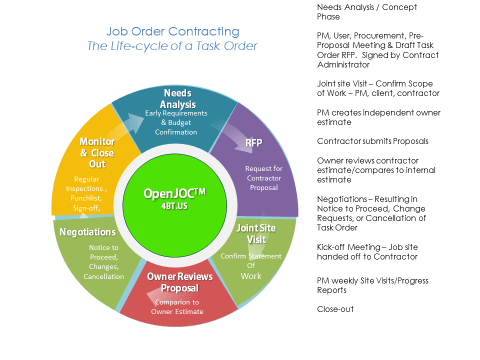
A typical JOC process has the following stages. Assure that the JOC Program has a similar process.
- Owner request for a JOC task order / project proposal.
- Joint Owner/Contractor site visit.
- Contractor prepared estimate/proposal.
- Owner review of contractor proposal. (Owner may generate and independent owner estimate for comparison to the contractor estimate, or review the contractor’s estimate in detail.)
- Owner/Contractor negotiations and/or changes as needed.
- Owner provides contractor with a notice to proceed (NTP).
- Project start and execution.
- Owner project sign off.
JOC Task Order Process: Don’ts
As noted the JOC task order process should encourage early and ongoing communication DIRECTLY with the owner, facility manager, and building user(s). If this is not the situation and if the only true source of information is an intermediary, such as a JOC consultant, additional clarification should be sought from the owner to assure proper information exchange. The inability to obtain and validate construction requirements directly from or with the owner is contrary to JOC best management practices and may significantly impact the construction contractor’s ability to reduce costs, shorten project delivery times, and mitigate disputes.
JOC Consultants sometimes will review and clarify the JOC task order requests and subsequently schedule a scoping meeting with the appropriate contractor(s). It is critical that the contractor(s) and owner conduct a joint site visit and define the scope of work.
The contractor(s) submits a job order package and the owner reviews to ensure it reflects the scope of work. A JOC consultant should never be paid a percentage of the total construction cost to accomplish all of these tasks in lieu of the owner. If this happens the owner has no true visibility into requirements and costs.
If the owner simply does a cursory review of the JOC task order package and then approves the task order, the fundamental benefits of JOC, as well as implicit checks and balances, are not fully present.
It could be argued that in this type of “false JOC” scenario, that JOC is simply being used to bypass traditional procurement techniques. The Owner in these cases is not providing leadership or enhancing their skills and capabilities, thus also not improving productivity.
JOC Education, Training, and Support: Do’s
Successful JOC Programs require current and ongoing education, training, and support. Building the best possible team with the highest level of capability and competency possible is what Job Order Contracting is all about. A full suite of education, training, and certification offerings can help bring confidence, comfort, and elevated performance to all Job Order Contract participants. Look for providers that provide direct access to training services as well as a network of business partners, professional associations, and universities.
Trainers should be subject-matter experts with national training experience in Job Order Contracting, Construction Cost Estimating, and Program/Project Management.
Look for the availability of multiple training formats to assure maximum participation and benefit for all levels of participants.
- Regional
- On-site
- Virtual (instructor lead and self-paced)
Training should include hands-on sessions, complete with JOC software and exercises. Developing skills and confidence enhances leadership and achievement of better overall outcomes.
Look for trainer involvement with organizations such as the Center for Job Order Contracting Excellence, CJE and Alliance for Construction Excellence, ACE.
Training should include modules about procurement rules and current legislation regarding JOC, and all other aspects of JOC set-up, implementation, and management.
JOC Education, Training, and Support: Don’ts
Despite decades of proven application of JOC, many real property owners and facility managers remain unaware of the fundamental best management practices associated with Job Order Contracting.
Standardized, open, and efficient deployment requires introductory, advanced, and ongoing education, training, and support provided by an independent, objective, and experienced provider. If these services are not provided by an independent and objective party, these issues should be raised with the real property owner and JOC consultant as appropriate.
This document is not providing, nor attempts to provide any form of legal advice. Please seek appropriate legal counsel.
Units of measure are commonly abbreviated using standard nomenclature.
An owner-managed Job Order Contract is a situation where the Owner has primarily developed, implemented, and manages the daily processes involved. A JOC consultant, if used, may have assisted in developing the program, or provides tools, training, and/or audits.
Cooperative’s Job Order Contract Managed Service is a situation where the Cooperative has primarily developed, implemented, and manages the daily processes involved. A JOC consultant, if used, may have assisted in developing the program, or provides tools, training, and/or audits.
The various services provided by a Job Order Contracting Consultant may include, but are not limited to:
· Strategic planning for the JOC Program
· Development of the JOC Program inclusive of a JOC Operations Manual
· Locally Researched Line Item JOC Unit Price Book
· JOC Program Marketing
· JOC Program Contractor Selection Support
· JOC Education, Training, and Support
· JOC Audits
· Review, clarify, document JOC Proposal Requests
· Participate in JOC Project on-site meetings
· Review JOC Proposals
· Review JOC Contractor Job Order Packages
· Verify JOC Contractor Proposals
· Monitor JOC Workflow
· Assure JOC Program Compliance
Open Book JOC – When a JOC is not a JOC
“Open Book JOC” is a term that has been floating around for a bit, and is a procurement mechanism that appears exclusive to the State of Arizona. The fact of the matter is, Open Book JOC is a classic oxymoron, or a best a fabricated term.
JOC, by its very definition uses a line item unit price book, UPB. as a required tool in preparing transparent, detailed, and verifiable construction cost estimates for projects/task orders. In fact, best management practices require that any JOC estimate shall not consist of more than 10% (by value), of items that are note derived from the unit price book.
Open Book JOC, should not be called JOC at all. Open Book JOC allows construction contractors to base pricing upon subcontractor and/or manufacturer quotes. This practices negates the benefits of using a Unit Price Book.
It’s ironic that Arizona should allow “Open Book JOC” use as leading construction authorities such as The Alliance for Construction Excellence / Arizona State University, and the Performance Based Studies Research Group / Arizona State University are located in the State and both would likely frown upon the concept.
Job Order Contracting should never be used as a means to bypass procurement or approve construction projects that otherwise would not have been approved by traditional procurement mechanisms.
 Job Order Contracts should always have the following features and characteristics…
- Collaboration
- Mutual Respect & Trust
- Line Iten Unit Price Book – UPB & Financial Transparency
- Owner Leadership without excessive management & control
- Shared Risk/Reward
- Supporting Technology
- Best Value Procurement
- Common Standard Terms, Definitions, & Data Architectures (UNIFORMAT, MASTERFORMAT, OMNICLASS)
- Continuous Education, Training, & Improvement
- Key Performance Indicators (KPIs) / Audits job
- Written Execution / Operations Manuals (Roles, Responsibilities, Deliverables, Workflows / Standardized Work Processes, Reporting Requirements…)
STATE BOARD OF EDUCATION ALTERNATIVE PROJECT DELIVERY METHODS RULES PROCUREMENT OF CONSTRUCTION USING ALTERNATIVE PROJECT DELIVERY METHODS
“For JOC job orders, the District shall set administrative limits to assure the $750,000 limit for each job order is not violated. The District shall review all job orders for accuracy of the estimate and document the basis for acceptance of the estimate. When a job order is $100,000 or larger and is being estimated without a pre-agreed upon unit price book, the District shall have an independent analysis of the job order costs. This analysis shall be documented. When JOC job orders are accomplished under a GMP type construction with out a unit price book, the process shall be open book.”
Job Order Contract
JOC is a proven, collaborative construction delivery method provides major advantages to Facilities Managers, Real Property Owners, AEs, Contractors, Subcontractors, and Facility Users. Leading Federal/County/State and Federal Government, Education, Transportation, Utilities, and Healthcare institutions leverage Job Order Contracting (JOC) to complete over 90% of their numerous renovation, repair, sustainability and minor new construction projects on-time and on-budget….and to the satisfaction of all participants!
Contractors develop mutually beneficial long term Owner relationships and more predictable revenue streams.
4BT-CE Cloud Estimating Software and the 4BT JOC Unit Price Book integrate Job Order Contracting best management practices with technology to allow for faster JOC Program development, implementation, monitoring, and continuous improvement.
Job Order Contracting for Owners – allows Owners to create more thorough project scopes, completer more accurate and transparent detailed line item cost estimates and bids, compare and select contractors that can work collaboratively to provide on-demand services, and monitor and reward performance. Job Order Contracting also encourages the use of local small and minority owned businesses. \
JOC for Contractors and AEs – Job Order Contracting helps Contractors and A/E’s to better understand and build to Owner requirements. Job Order Contracting provides a platform to develop longer term, collaborative relationships.
4BT delivers unit price book cost data, software, services, and training to support success among Owners, Contractors, Subs, and AEs.
Our team has supported hundreds of Owners and thousands of contractors in their use of Job Order Contracting.
While a higher level of competency, experience, and commitment are required to implement successful Job Order Contracts, benefits outweigh any resource needs. In fact, traditional methods of construction delivery and construction services procurement can not come close to providing the positive outcomes attainable from Job Order Contracting .
4BT is a veteran-owned small business with senior professionals having decades of experience supporting, managing, and providing services for Job Order Contracting. We believe that education, training, and support are critical to the success of any Job Order Contract, and our team thrives in these areas.
We have been involved in hundreds of Job Order Contracts performing billions of dollars of renovation, repair, and minor new construction works.
Improve efficiency and obtain high quality outcomes through the use of independent, objective, and powerful tools and services.
Job Order Contracting Products and Services
Training
Regional, on-site, and virtual hands-on training and certification for all job order contract participants. Introductory and advanced classes are structured for all skill levels, as well as refresher courses. Training content is tailored to the participants.
Sample Topics Training Courses:
• Introduction to Job Order Contracting / LEAN Construction Delivery
– Management by Outcomes
– Key Characteristics
– Requirements
• Introduction to Line Item Estimating
• Introduction to Cost Estimating
• ESS Getting Started
• ESS Advanced
• Job Order Contract Execution / Operations Manual Development
• Marketing a JOC Program
– Internal
– External (Contractors)
• Individual Job Order Request / Request for Proposal Process
• Auditing a JOC Program
• How to Create a JOC RFI/RFP
• How to Evaluate JOC Contractors
• How to Create an Owner / Independent Government Estimate
• Job Order Contracting Best Management Practices
– Responsibilities
– Workflow
– Documentation
– Approval Process
– Audits
– Key Performance Indicators
– Small Business / MBE
• How to Create a JOC Estimate – Into & Advanced
– Appropriate level of detail
– Price versus non-prepriced items
– Hand-on Exercises
– Site visit planning
– Content/Documentation Packages
• Owner/contractor communications/documentation
– Inspection reporting
– Deficiencies/corrective actions
– Signoff
– Payment
– Owner/Contractor Negotiations
– Problem-solving principles and Tools
JOC Unit Price Book Cost Data
- Unit Price Books (UPB) – Locally research construction tasks complete with labor, material, and equipment details, based upon Davis-Bacon wage rates. Custom line items are also available. All data is provided using common standard term with minimal use of abbreviations. All cost data is organized by CSI Masterformat.
- Specifications – Industry standard commercial construction specifications can be provided as needed and are organized by CSI Masterformat. Custom specification development services are available.
Support
Technical support for software and unit pricing is provided via telephone and email. 4BT team member have had experience with hundreds of JOC Programs, thousands of JOC Contractors, as well as Cooperatives providing JOC services (i.e. Allied States, TCPN) in terms of assisting in developing JOC programs, developing unit prices books, providing JOC project/task order line item cost estimates, providing general and detailed estimate reviews, creating and deploying client server and web-based software.
Job Order Contracting is a collaborative LEAN construction delivery method. As such it integrates core characteristics outlined as follows, as well as specified workflows, processes, data architectures, deliverables, and outcomes.
Best value development and deployment of Job Order Contracting requires multi-discipline / multi-trade knowledge, LEAN construction processes, common terms-definitions-data architectures, leadership and program/project management, and supporting/enabling technology.
Key characteristics of Job Order Contracting and LEAN Construction Delivery include:
• Collaboration
• Mutual Respect & Trust
• Financial Transparency
• Owner Leadership without excessive management & control
• Shared Risk/Reward
• Best Value Procurement
• Common Standard Terms, Definitions, & Data Architectures (UNIFORMAT, MASTERFORMAT, OMNICLASS)
• Continuous Education, Training, & Improvement
• Key Performance Indicators (KPIs) / Audits job
• Written Execution / Operations Manuals (Roles, Responsibilities, Deliverables, Workflows / Standardized Work Processes, Reporting Requirements…)
Additional Job Order Contracting Services
- JOC Estimating Services
- Independent Government Estimating (IGE) Services
- 3rd Party Independent Estimating Auditing Services (formal line item estimate audit, reviews for budget reviews, change order estimate auditing, quantity takeoff, technical evaluations and estimate comparison along with our comments, conclusions and recommendations)
- Budget Collaboration Reviews
- Program Management
How to Select a JOC Unit Price Book
| How to Select a JOC Unit Price Book– WHITE PAPER |
| A Common Data Environment in the form of a locally researched detailed Unit Price Book, UPB, significantly improves renovation, repair, maintenance, and new construction outcomes. |
INTRODUCTION
A Unit Price Book – UPB – is very important to the quality, integrity, productivity, and transparency of a Job Order Contract.
That said, not all JOC Unit Price Books are the same, and the selection can benefit greatly from a strategic review of the goals and objectives of your JOC Program.
Here are a few items to consider when selecting a JOC Unit Price Book.
Is the UPB locally researched for the cities, counties, states, and/or regions for the JOC area, or does it depend upon location factors? The use of location factors and an associated contruction price book based upon national average costs can introduce gross errors versus having a unit price book locally researched for your specific location(s).
What labor rates are being used and how detailed is the information? All federal JOCs and a growing number of state/county/local JOCs require Davis-Bacon wage rates. Davis-Bacon wage rates are applied differently depending on the location, and the researcher. Some are dependent upon mileage from a central location, others by region, etc. The UPB should incorporate the highest level of detail available and the most recent cost data. Labor generally represents 60% of the total cost of construction project, thus accurate labor information is very important.
Do crews represent real world construction practices? Many of the commonly used price books, even the “leading cost books”, may not have crews that represent your work practices. This can lead to inaccurate productivity rates and significant errors in construction costs.
Are tasks described in plain English and are terms common to the trade used? Using a UPB can be extremely difficult if tasks are not easily and fully understood. Abbreviations should be limited to units of measure, and even then, used in a consistent manner.
Is a common data architecture used for line item organization? The use of CSI Masterformat for data aggregation helps to assure efficient distribution, modification/updating, and proper use of the UPB in concert with JOC Program procedures and goals. The cost database and associated projects and estimates can be cost effectively created, stored, maintained, and used within a common data environment (CDE) and JOC-specific technology.
Is the size of the UPB manageable? Some UPB providers provide hundreds of thousands of line items. An excessive number of UPB line items can be a detriment. Most JOCs involve common renovation and repair tasks and commonly use less than 30,000 line items on a repeatative basis. Excessive numbers of line items can slow productivity, introduce errors, and cause confusion
Are line item modifiers used? Modifiers are important as they add or deduct costs from the “parent” line item based upon variables such as quantity, material qualities, etc. Modifiers, on average, account for 30% of the cost a JOC task order.
Are demolition line items present? As JOC Programs focus upon renovation and repair, demolition line item costs are an important component JOC unit price book and most JOC estimates.
Are full training and support services available in multiple levels (introductory, advanced) and formats (on-site, regional, virtual)? Ongoing training and support by senior JOC professionals are critical to program success.
Is the UPB vendor independent from your JOC program? It is critical that any JOC consultant involved in approving individual JOC task orders not be compensated on a percentage fee basis of the project construction cost. This has been noted as a structure to be avoided in various audits by government agency auditors.
Glossary and Supplementary Notes:
Collaboration – Collaboration among construction project participants and/or stakeholder is critical to assuring a proper definition of the scope of services, and thus mandatory if the estimate is to reflect the expectations of the owners, design, contractor, etc. Achieving the best possible outcome for the estimate and the overall construction project, is dependent upon the processes involved in gathering accurate information in a timely manner. Employing the actions and philosophies associated with continuous improvement and LEAN best management practices adds to the overall success as well.
Contractors – Detailed, unit price, line item estimates are used to bid jobs and also done by general contractors and construction managers to validate bids from sub-contractors.
Detailed cost estimate – A forecast of construction cost, prepared on the basis of a detailed analysis of materials and labor for all items of work.”– 13th edition of the Architect’s Handbook of Professional Practice
Material, Equipment, & Labor – A detailed, unit cost, line item construction cost estimate involves a review and understanding of the scope of work of the associated project, including all possible factors and risks. Materials, labor, and equipment costs are provided in the highest level of granularity.
Owners – Real property owners and/or facilities managers responsible for life-cycle management of the built environment. Detailed, unit price, line time estimates are required by public agencies for most JOC/IDIQ construction projects. If the project exceeds a specified dollar threshold, an independent owner estimate must also be created (also called an independent government estimate – IGE). Line item estimates are also used to create and validate construction budgets.
Productivity – Earned value work accomplished, generally represented as a percentage. Construction productivity can be affected by multiple variables; labor composition, skill level, weather, work flow, site access, materials availability, etc.
Required Skills – Field experience at construction sites is extremely important, as is the only way to gain a true appreciation of processes, risk factors, and other variables that can impact a construction project. The ability to review and interpret construction drawings, work with cost estimating formulas and technologies, and the ability to communicate information to disparate disciplines and audiences are also vital.
Process Tasks – Processes associated with creating a line item construction cost estimate include the following:
Full definition of the scope of services requires several considerations, such as:
- Estimate preparation
- Validation of contents and assumptions
- Estimate reconciliation (if multiple estimates are required for a project)
- Documenting and presenting the estimate
- Identifying inclusions and exclusions
- Defining the basis to be used for pricing (construction cost databases and/or unit price books – UPB, unit price guides, subcontractor quotes)
- Presentation of line items as bare costs or inclusive of overhead and profit
- Classification system to be used, i.e. CSI MasterFormat, Uniformat II, WBS, etc.
- Format of the estimate (summary level, detailed level, price vs. non pre-priced items, associated formulas, source of each line item).
The above information is via Four BT, LLC – Best value provider of JOC solutions: Unit Price Books, Technology, support, training, and professional JOC services – 4BT.US
4BT.US
 LEAN Construction Project Delivery Methods - Job Order Contracting, IPD, 5D BIM